Keep every application in one place
If you send work out often, you know the feeling. Three poems are with three magazines, a residency closes on Friday, a grant you applied for in spring still hasn’t answered, and the only record of any of it is your inbox and a spreadsheet you stopped updating in March.
Missa’s Tracker keeps all of it together: the calls you want to apply for, the ones you’re working on, everything you’ve sent and every answer you get back. It works the same for a poem, a story, a residency, a grant, a fellowship, a prize or a gallery call, wherever in the world it is.
This guide walks through it with screenshots from a demo account. The calls in it are real listings on Missa, and the statuses are examples. The rows imported from a spreadsheet use made-up names.
Save a call when you find it
When you find a call you might apply for, save it. You don’t have to decide anything yet.
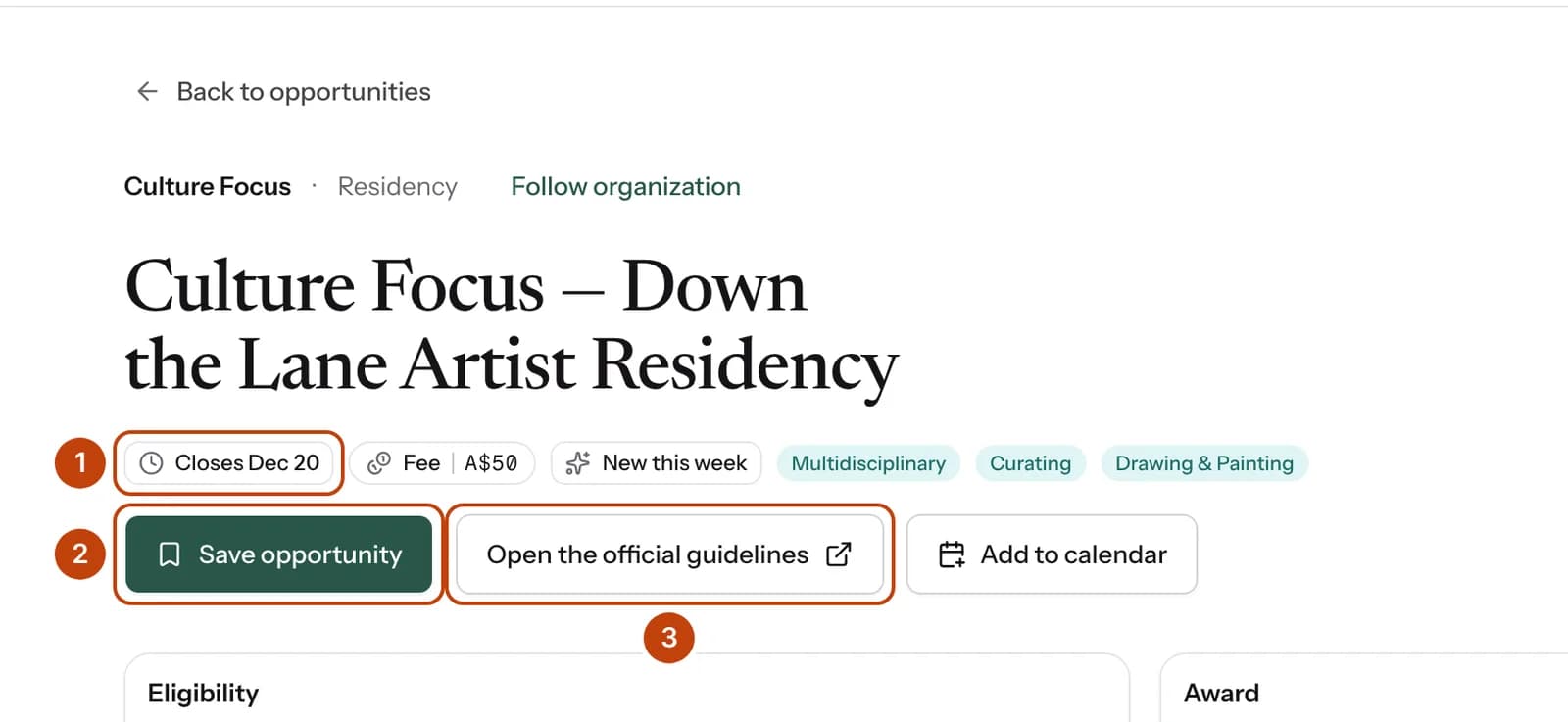
- The deadline. If the organizer moves it, your Tracker shows the new date.
- Save opportunity puts the call in your Tracker. Missa reminds you a week before it closes and again the day before, in your Missa Inbox.
- Open the official guidelines takes you to the organizer’s own page. Read it before you apply, because that page is the one that counts.
You can save calls from anywhere on Missa: open calls, residencies, grants, or a magazine’s page.
Bring your old spreadsheet with you
Most people already have a list somewhere. Bring it, as it is. Missa reads CSV, Excel and OpenDocument files with up to 10,000 rows, and Google Sheets once you download the sheet as Excel or CSV.
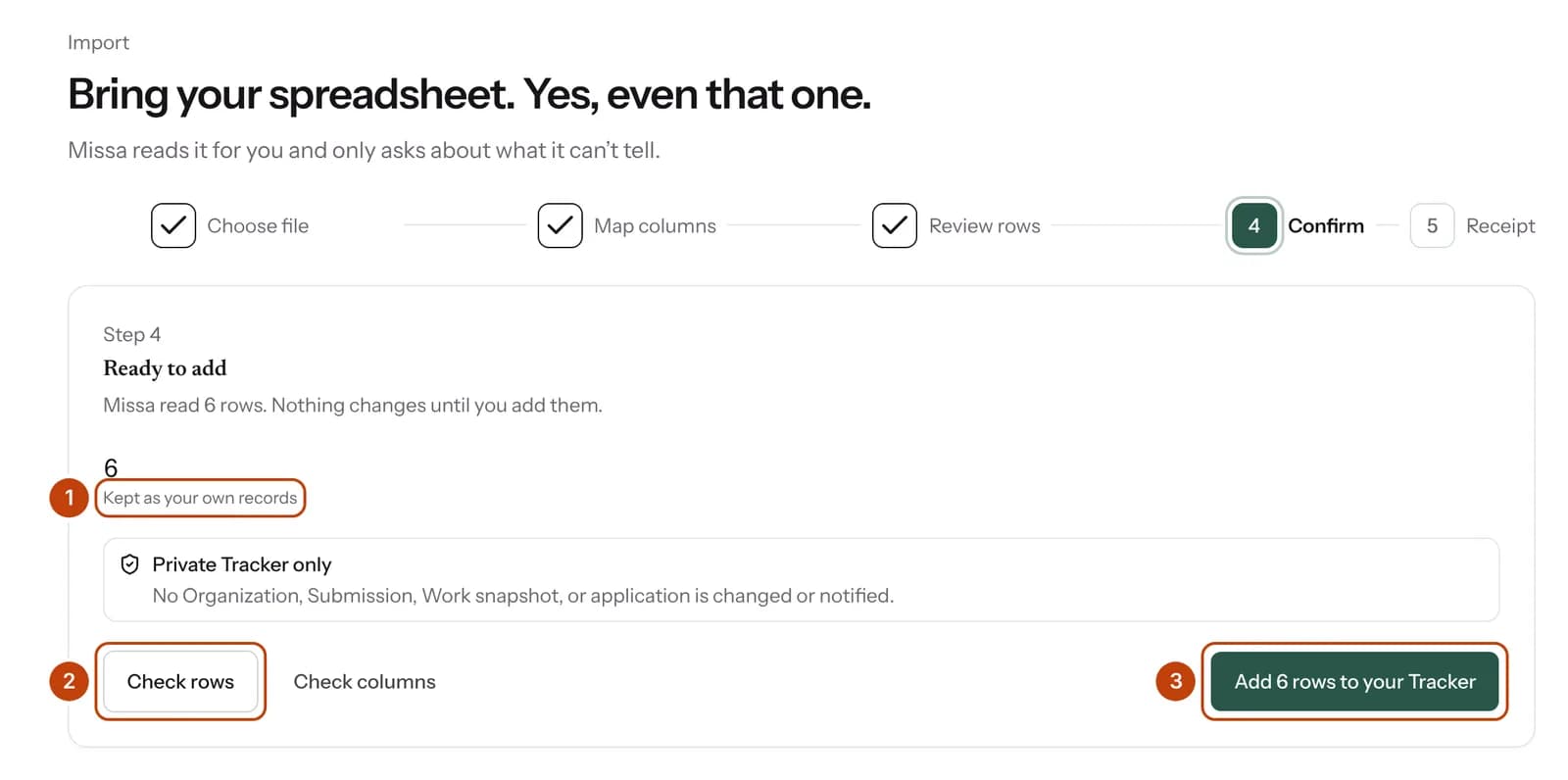
- Every row stays yours. Nothing you import is shared with a magazine, a residency or anyone else.
- Check rows lets you look at each row before anything changes. Missa only opens this step on its own when it can’t place something.
- Add 6 rows to your Tracker finishes the import. You get a receipt, and you can keep your original file as a backup.
Go to Import to start. Columns called Title, Organization (or Magazine, Publication, Venue, Gallery, Funder), Date sent and Status work best.
See everything you have out
Your Tracker puts every application on one page, with the next thing to do on each.
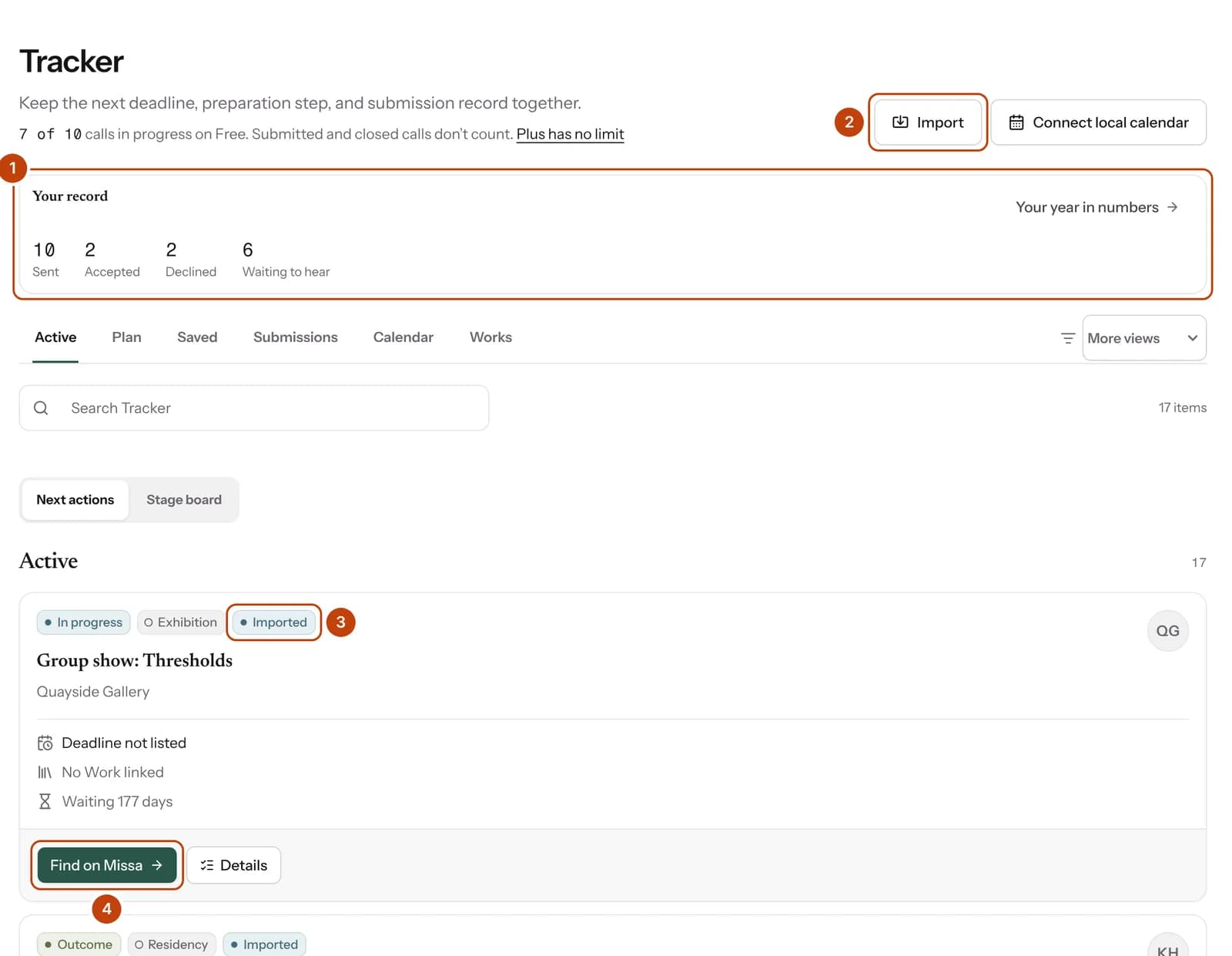
- Your record counts what you’ve sent, what was accepted and declined, and what you’re still waiting to hear about. It counts imported rows too, so your history starts the day you first sent work out, not the day you joined.
- Import brings in another spreadsheet whenever you need it.
- Imported marks a row that came from your sheet.
- Find on Missa searches Missa for that organization’s calls, so you can see what they have open now.
The tabs along the top split the same list different ways. Plan groups what you’re preparing by how soon it closes. Saved holds calls you haven’t started. Submissions shows everything you’ve sent. Calendar shows your deadlines on a calendar.
Move applications through each stage
Switch to Stage board to see your applications as columns: Saved, Preparing, Submitted, In progress and Outcome.
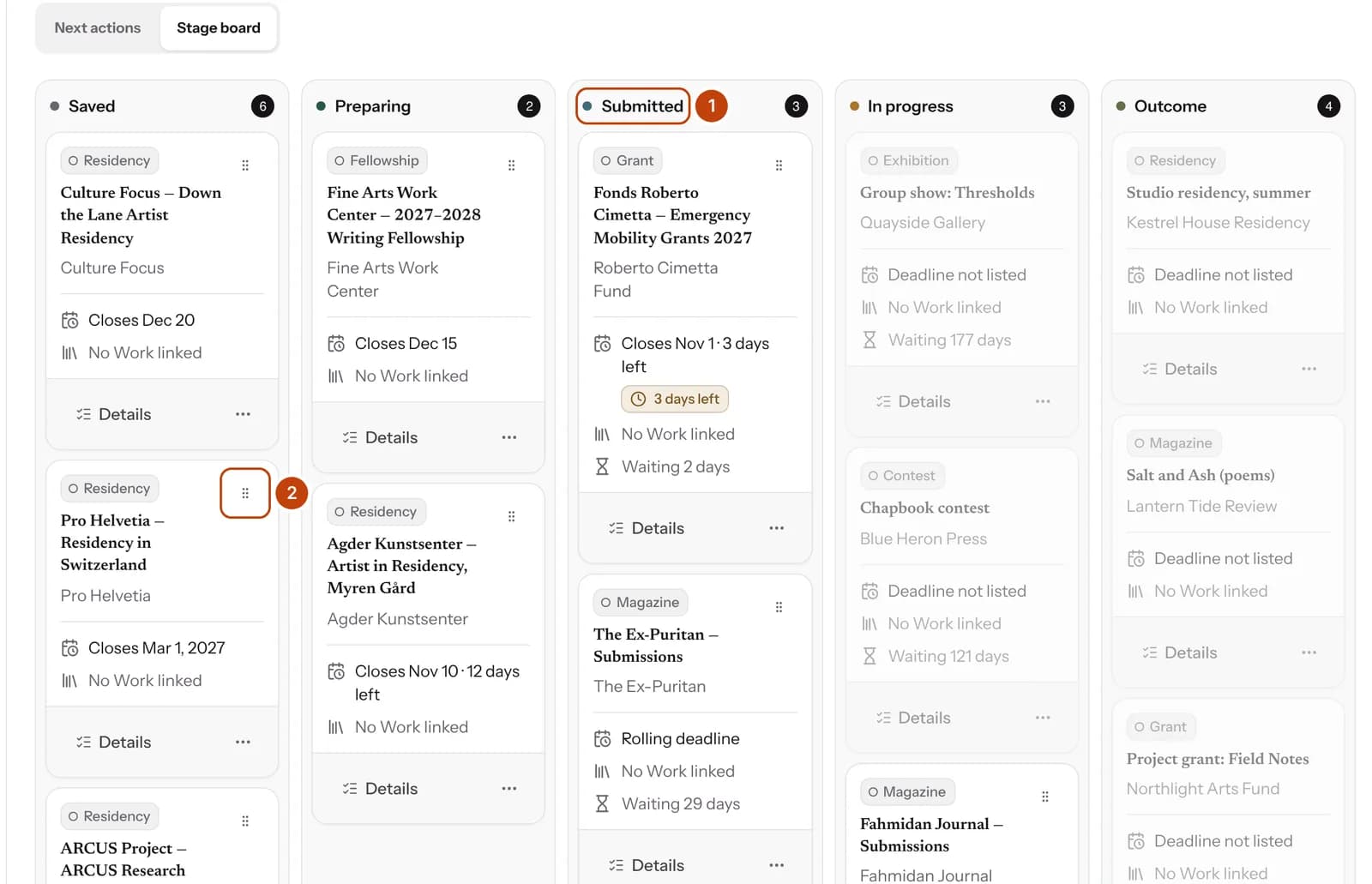
- Each column is a stage. The number beside it tells you how many applications are there.
- Drag the handle to move a card. If you’d rather not drag, open the ⋯ menu on the card and choose Move to.
On the list view, each card has a status menu that does the same job.
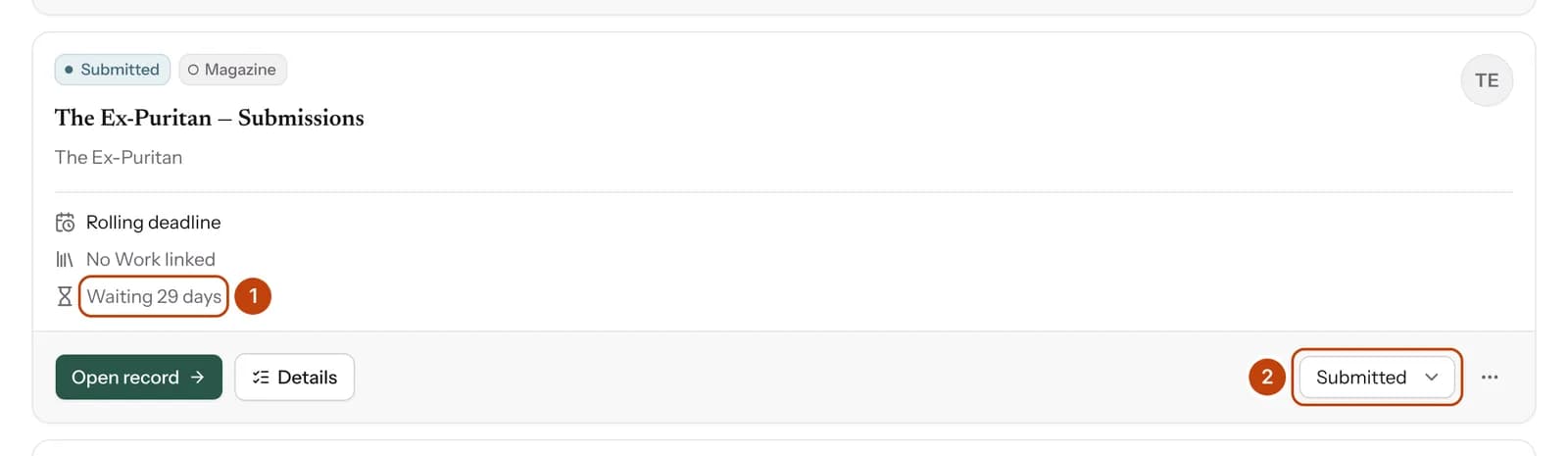
- Missa counts the days since you sent it, so you can see at a glance what’s been out longest.
- When you hear back, change the status here: In Review, Accepted, Declined, Waitlisted or Withdrawn.
Get ready before each deadline
Open Details on any call to see everything about that application in one panel.
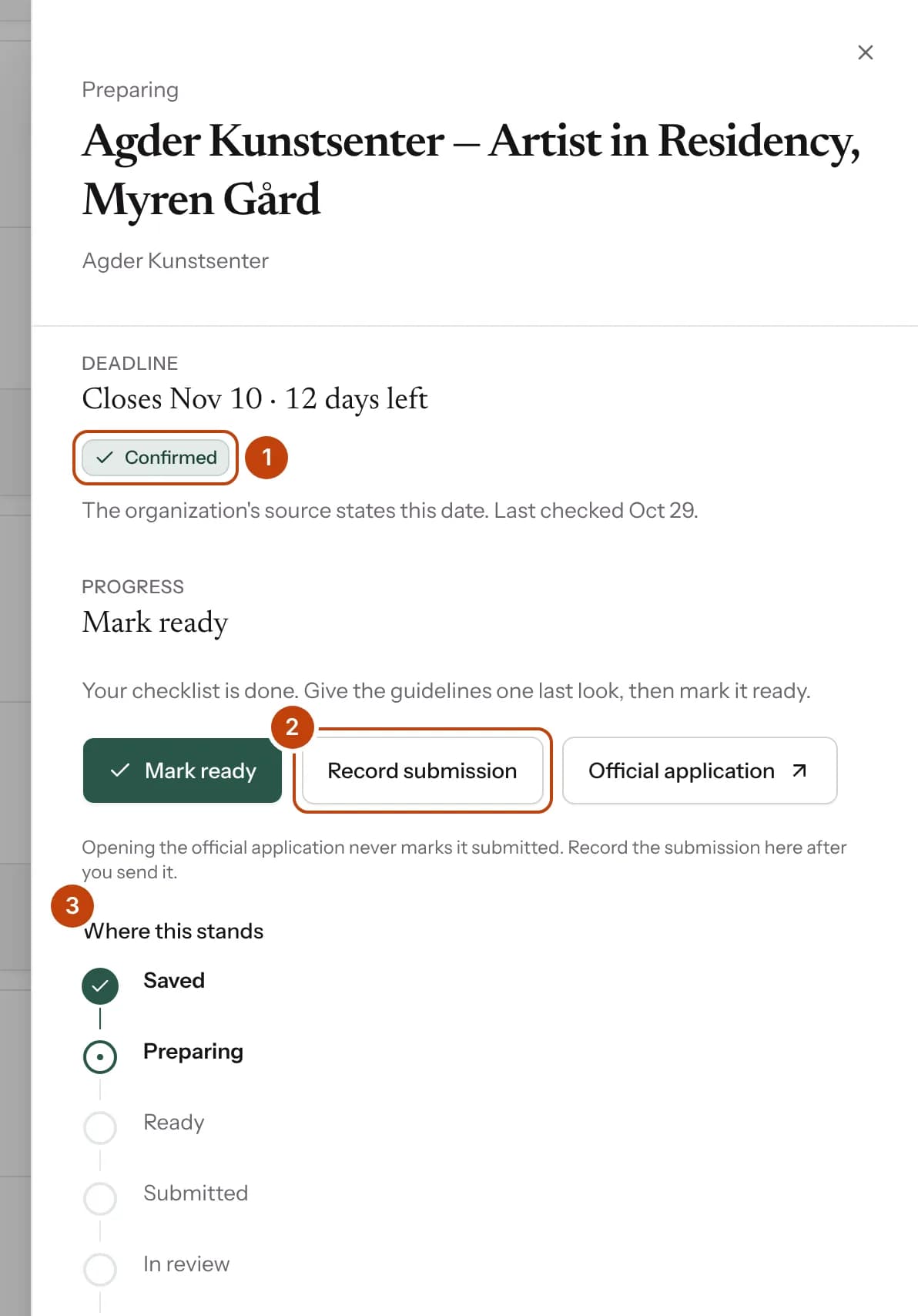
- Confirmed means Missa read this deadline on the organizer’s own page. Below it, Missa shows when it last checked that page.
- Record submission is how you tell Missa you’ve sent it. Opening the official application never marks it sent for you.
- Where this stands shows each stage, from saved to an answer.
Further down the same panel, you set your own reminders.
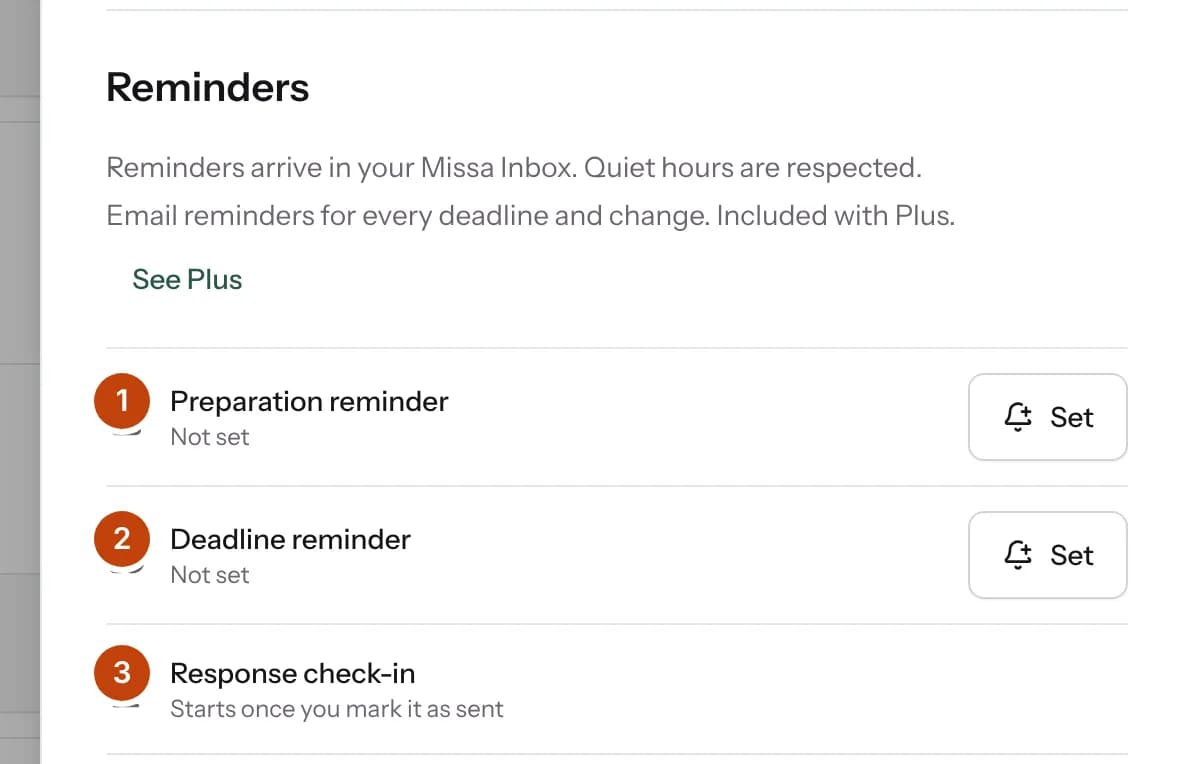
- A preparation reminder nudges you to work on it, on the day you pick, and it can repeat.
- A deadline reminder adds another alert before the call closes, on top of the week-before and day-before ones Missa sets when you save.
- The response check-in starts once you’ve sent it. If the wait runs long, Missa asks whether you’ve heard back.
You can also set a target date of your own, to finish a few days early. The official deadline stays as it is. If you’d like your deadlines in the calendar app you already use, choose Connect local calendar at the top of the Tracker.
Record what you sent
When you’ve sent an application, record it. Missa never marks anything sent for you, because only you know whether you pressed the button.
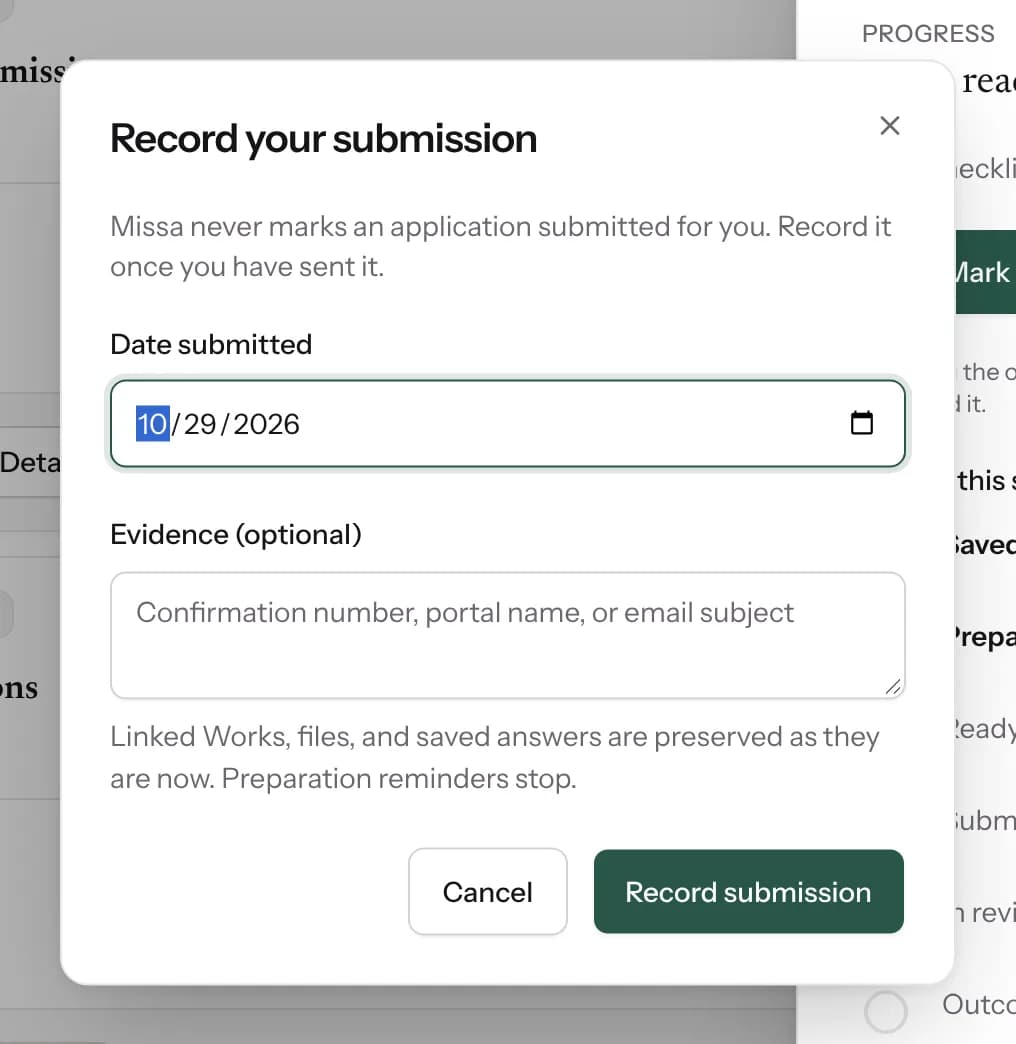
Add the date you sent it. If the organizer gave you a confirmation number or sent a receipt email, put it in Evidence so you can find it later. Once it’s recorded, your preparation reminders stop and the wait starts counting.
When an answer comes
When a magazine, a residency or a funder gets back to you, change the status on the card. Your record updates straight away.
If you mark something Accepted while the same piece is out somewhere else, Missa reminds you to withdraw it from the others. It lists the submissions still out, so you can write to each editor before they spend time on a piece that’s already taken. If you linked the piece from your Library, it only lists the places that have that piece. Missa doesn’t contact anyone for you.
Log a decline too. Over a year, your Tracker shows every place you sent work and how each one answered, which makes it easier to choose where to send next.
Calls you send through Missa
Some magazines, presses and residencies take submissions on Missa itself. Their calls carry a Submit on Missa or Apply on Missa badge. When you send work that way, it goes into your Tracker on its own, and when the organization makes a decision, your Tracker shows it. You don’t have to update anything by hand.
For everything else, send it on the organizer’s own site, by email or through their portal, then record it in your Tracker.
A habit that keeps it working
A tracker only helps if it’s right. Two minutes after you send something, and two minutes when an answer arrives, is all it takes. Once a week, open the Plan tab and see what closes next. That’s the whole routine.
If you’re looking for your next call, start with calls closing this week, residencies, grants or magazines open all year.
Calls closing soon
Questions people ask
Yes. On the Free plan you can work on up to 10 calls at a time, and calls you’ve sent or that have closed don’t count toward that. Plus has no limit and adds email reminders for every deadline and change.
No. Your Tracker is private. Saving a call, importing a spreadsheet or marking something accepted doesn’t notify anyone.
Yes. Log each one as its own submission. When one is accepted, Missa lists the others still out, so you can withdraw the piece everywhere else.
Yes. The Tracker works the same for every kind of call: magazines, small presses, prizes, residencies, fellowships, grants, exhibitions and festivals.
Yes. Import reads CSV, Excel and OpenDocument files. For Google Sheets, download the sheet as Excel or CSV first. Your rows stay private, and nothing is added until you confirm.
No. Opening the official application never marks it sent. You record it yourself once you’ve sent it, so your record only shows what really happened.
Tell us if anything in this guide has changed.